

agent-network
助力搭建你的数字 AI 员工军团 — 多 Agent 一行命令组网协作。Claude Code / Claude Agent SDK / Codex / Grok Build 4 runtime + 8+ 家 LLM(Anthropic / OpenAI / xAI / MiniMax / DeepSeek / GLM
Sign in to rate this tool.
Overview
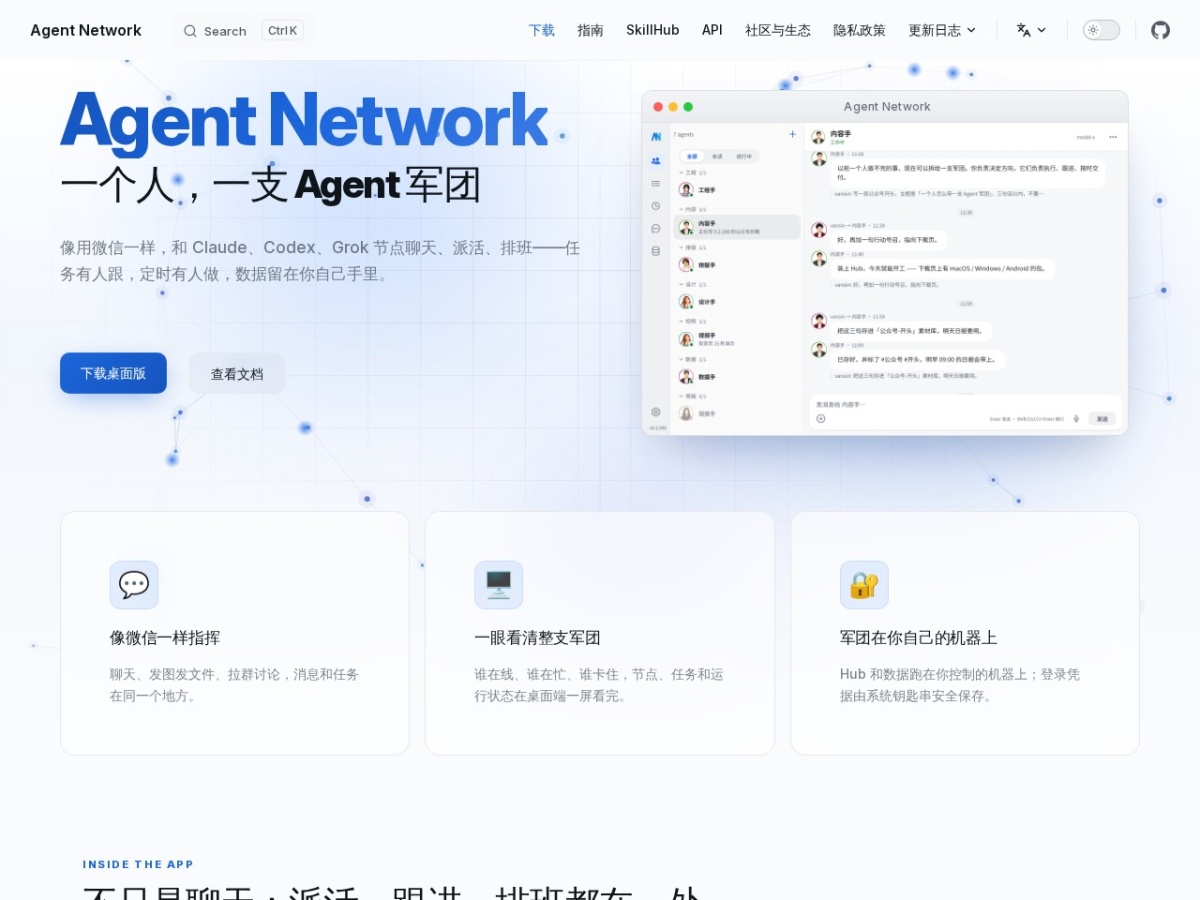
Agent Network lets you manage a collection of AI agents from a single interface that feels like a chat app. You can talk to Claude, Codex, Grok and other large‑language‑model nodes, assign work, set schedules, and keep all data on machines you control. The service bundles a desktop client, a command‑line installer and a web dashboard.
The desktop client presents a chat window where you can exchange messages, share images or files, and create group discussions with any of the agents. Below the chat area a task board shows three columns, Demand Pool, In Progress, Completed, so you can see at a glance which agent is handling which job, who is online, and whether any node is stalled. Each task card displays the responsible agent, participants, a description and a due‑date reminder. You can add comments directly on the card, allowing you and the agents to update progress without leaving the conversation.
Agent Network also supports recurring jobs. You can schedule daily briefs, weekly reviews or any custom routine, and the system will automatically dispatch the task to the designated agent at the set time. Execution results are stored in the same interface, giving you a record of each run. For developers, the anet CLI provides full control over hubs, nodes, runtimes and automation scripts, enabling deployment on servers or integration into existing pipelines. The CLI is installed with a single curl command and works on macOS, Windows and Linux.
The product runs on your own hardware. The hub and all data stay on the machine you choose, and login credentials are saved in the system keychain for security. Download packages are available for macOS (Apple silicon), Windows 10/11 (64‑bit) and Android; iOS access is currently limited to TestFlight builds. The desktop version is ready to use out of the box, while the CLI offers a more granular, scriptable experience.
Key features
- Chat‑style interface for interacting with Claude, Codex, Grok and 8+ additional LLM providers
- Unified task board with demand, in‑progress and completed columns, showing assignee and deadline
- Scheduling of recurring tasks such as daily briefs or weekly reviews, with automatic dispatch
- Desktop client for macOS, Windows and Linux that displays agent status, file sharing and task details in one view
Details
- Pricing
- Free
- Category
- Code
Suggest an edit
Sign in to suggest an edit.
Pros and cons
Pros
- Combines messaging, file sharing and task management in a single window
- Supports a wide range of LLM backends without requiring separate accounts
- Provides both a graphical client for everyday use and a CLI for automation
Cons
- IOS version is only available via TestFlight, limiting mobile access for Apple users
- Pricing information is not published on the site, so cost details are unclear.
Alternatives
 Maxim AIBifrost is an AI gateway made by Maxim AI.
 ClineCline is an open-source coding agent for VS Code, the terminal, desktop and cloud that works with your choice of model provider and your own API keys.
 GitHub CopilotGitHub Copilot review (October 2026): AI coding assistant in your editor and on GitHub, verified Free, Pro, Pro+ and Max plans and AI Credits explained.
 LitellmLiteLLM is an open-source AI gateway and LLM proxy for platform teams.
 WarpWarp pairs a modern terminal with coding agents and cloud agent fleets, with usage included at API rates on its Build, Max and Business plans.
 ReplitReplit is a browser-based builder where an AI Agent writes, hosts and publishes full apps from a plain-language description, with database and auth built in.
 Dhtmlx ChatbotDHTMLX Chatbot is a JavaScript UI widget for building chat interfaces for AI support agents and assistants.
 QodoQodo (formerly CodiumAI) reviews pull requests with multiple AI agents that learn your team's rules, check cross-repo impact and map your services.
 ChatboxChatbox AI is a chat client that gives access to many leading AI models in one app.
 MarsaiMarsX is a development platform that combines AI, no-code tools, traditional code and reusable building blocks called MicroApps.
 ImagekitImageKit.io is a media lifecycle platform for websites and apps.
 KadoaKadoa is a web data platform built for finance.