


Sign in to rate this tool.
Overview
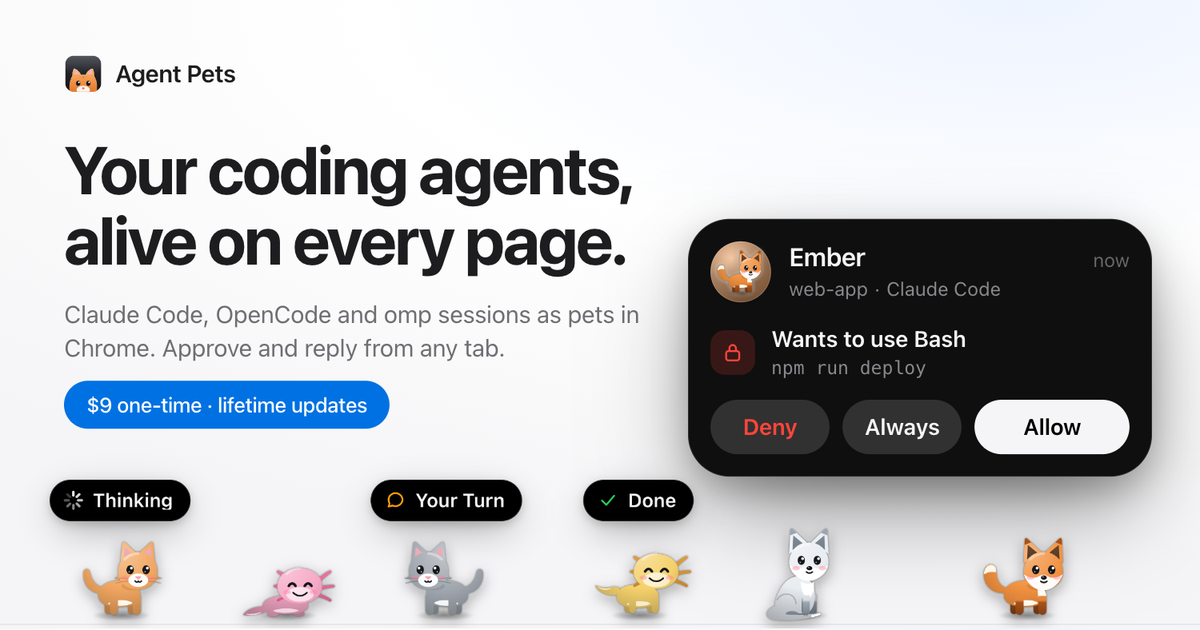
Agent Pets is a Chrome extension that turns Claude Code, Codex, OpenCode and omp sessions into small animated pets that live on every page. A pet appears at the bottom of the browser whenever an agent needs a permission or has a new reply. Users can click the pet or receive a desktop notification to approve, deny or reply without leaving the current tab.
The tool works in any Chromium‑based browser, including Chrome, Edge, Brave and Arc. After installation you run a single Node command: `npx getagentpets init`. The command writes hooks into the configuration files of each agent, installs an agent‑pets helper process on `127.0.0.1`, and puts a small extension file into `~/.agentpets/extension`. The extension can then be loaded in Chrome by enabling Developer mode, clicking “Load unpacked” and selecting that folder. A license key from the purchase is pasted into the extension to open up the pets. The helper then listens for agent activity and displays the pet animation.
When an agent asks for an external action, the pet bounces and a capsule that shows the task appears above it. Clicking the pet brings up an inline dialog with buttons for Allow, Always, Deny or a reply field. If you are on another app, a system notification pops up with the same options, letting you respond without switching windows. The toolbar badge counts how many sessions are waiting. Pets can be customized: upload a photo of a cat, crop it, choose a body colour, name it and then move to “Gather” or “Roam” mode. Seasonal costumes automatically replace the pet's appearance during pre‑specified dates; the setting can be turned off.
Each agent session is processed locally, the only network traffic is for license validation with Dodo Payments and periodic update checks via npm. No account is required, and no data leaves the machine. The extension and helper run in the background as a daemon on macOS, and can be started manually on Linux or Windows.
Key features
- Pets appear on every Chromium tab when an agent needs approval or a reply.
- Inline approval interface shows Allow, Always, Deny or a text reply.
- Desktop notifications give quick access to actions without window switching.
- Customizable pet appearance with photo uploads, colour choices and names.
Details
- Pricing
- Free
- Last checked
- 6h ago
- Indexing
- noindex, follow
- Category
- Code
Suggest an edit
Sign in to suggest an edit.
Pros and cons
Pros
- One‑time purchase keeps all updates included.
- Works with multiple agents: Claude Code, Codex, OpenCode and omp.
- Smooth integration: a single installation command sets up everything.
- Desktop notifications reduce context switching.
- Customizable pets add a light‑hearted element to development.
Cons
- Requires Node.js 18 or later for installation.
- Only supports Chromium‑based browsers.
- No detailed public pricing tier beyond the one‑time fee.
Alternatives
 CursorCursor review (October 2026): AI-first code editor with agents, verified Hobby, Pro, Pro+, Ultra and Teams pricing, privacy mode, pros and cons.
 GitHub CopilotGitHub Copilot review (October 2026): AI coding assistant in your editor and on GitHub, verified Free, Pro, Pro+ and Max plans and AI Credits explained.
 QodoQodo (formerly CodiumAI) reviews pull requests with multiple AI agents that learn your team's rules, check cross-repo impact and map your services.
 AgentqlBuilt for ai agents work, Agentql combines capable AI with straightforward design. It is the kind of tool you can start using immediately. Rather than chasing every possible feature, Agentql...
 My Real Estate Listing AIYou will find a free plan, making it easy to test the tool against your own needs first. The practical way to judge it is to use it. You are...
 Page CanaryIt works well as a daily driver. Saved templates, recent history, and multiple output options mean the tool adapts to the way you actually work. For a straightforward look at...
 Applitools EyesIt runs on a free model, so getting started is a low-risk decision. After a few sessions you will know quickly whether it fits. Applitools Eyes brings a fresh take...
 KadoaIf ai coding tasks take up too much of your day, Kadoa is built to give you time back. It handles the heavy lifting while leaving you in control. A...
 Kilo AIUnderneath it all, the processing is efficient enough for everyday use. Large inputs take a moment, but ordinary work flows through without interruption. Kilo AI brings a fresh take on...
 ReplitReplit is a browser-based builder where an AI Agent writes, hosts and publishes full apps from a plain-language description, with database and auth built in.
 ClineCline is an open-source coding agent for VS Code, the terminal, desktop and cloud that works with your choice of model provider and your own API keys.
 LiftmycvThe feature set covers the basics well and adds thoughtful extras - keyboard shortcuts, reusable templates, and clean sharing options - without overwhelming you. For a straightforward look at an...