


avibe
The local-first Agent OS — your AI partner lives on your own machine. Drive the official Claude Code, Codex & OpenCode from your browser or any chat app.
Sign in to rate this tool.
Overview
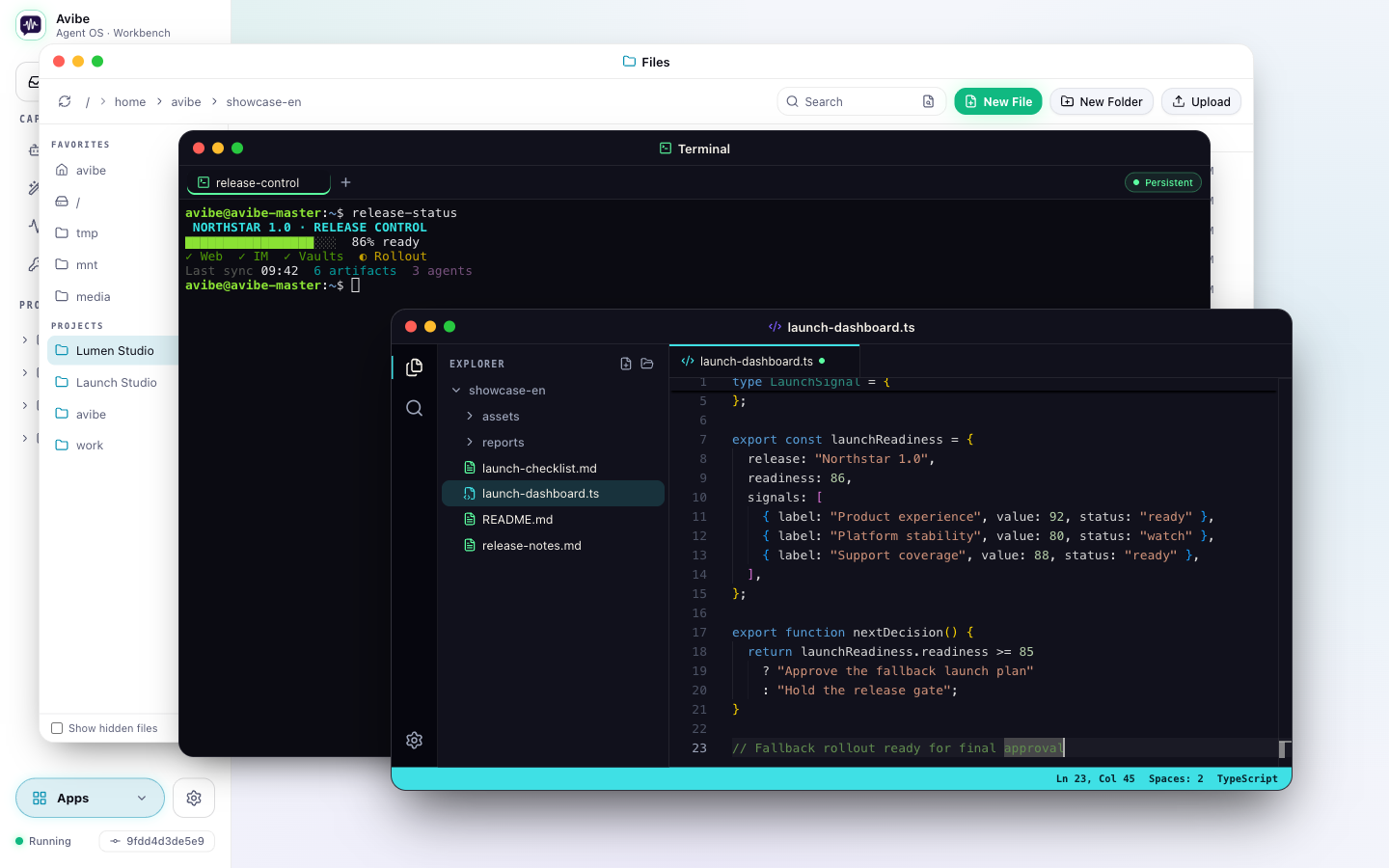
Avibe is a local‑first Agent OS that turns your computer into a companion for Claude Code, Codex, and OpenCode. It installs on your machine and provides a browser‑based Workbench, durable automation tools, multi‑agent run graphs, Show Pages, Vaults, and messaging integrations.
You install Avibe with a simple shell command (`curl -fsSL https://avibe.bot/install.sh | bash`). Once running, all code, keys, and agent processes remain on your device. The OS consolidates the three official agent CLIs into a single runtime, so you can interact with Claude Code, Codex, and OpenCode from the same interface.
The Workbench surface gives you a desktop‑style environment: files, a terminal, and the agent's created pages appear in the same windowed workspace. Multiple windows can stay open and arranged like a normal desktop, letting you keep every project and session within reach. For durable work, the Use lets you schedule recurring briefings, watch CI or file changes, and run tasks in the background. Each task's definition, next trigger, owning agent, and delivery path are inspectable and can be returned to later.
When agents need to hand a job to another, the Run Graph visualises the chain of responsibility. Each node shows the owner, session, status, and callback path, and you can open a node to see its transcript and run history. Show Pages allow agents to create live dashboards, diagrams, or reports; you can annotate specific elements or screenshots and continue the discussion in place.
Vaults provide secure credential access. Agents request named secrets through an explicit approval flow; the Vault responds with metadata, not the secret value, keeping sensitive data out of public sessions. Messaging surfaces, Slack, Discord, Telegram, WeChat, and Lark, share the same sessions as the browser, while a mobile Workbench on your phone lets you review jobs and approve actions on the go.
Key features
- Local‑first design: code, keys, and agent processes stay on your machine.
- Single runtime for Claude Code, Codex, and OpenCode CLIs.
- Browser Workbench with files, terminal, editor, and agent‑created pages.
- Durable Use for scheduled tasks and watches.
- Run Graph to visualise multi‑agent workflows.
- Show Page with in‑place annotations and interactive dashboards.
- Vaults with explicit approval flow for secret access.
- Messaging integrations: Slack, Discord, Telegram, WeChat, Lark.
Details
- Pricing
- Free
- Category
- Code
Suggest an edit
Sign in to suggest an edit.
Pros and cons
Pros
- Keeps all agent activity on the local machine, no cloud transfer.
- Unified interface for three official CLIs.
- Durable work via Use and background sessions.
- Visual Workflow tracking with Run Graph.
- Secure credential handling through Vaults.
Cons
- No published pricing information available.
- Requires installation on a compatible machine.
- Relies on official agent CLIs; no support for third‑party agents noted.
Alternatives
 ChatboxChatbox AI is a chat client that gives access to many leading AI models in one app.
 GitHub CopilotGitHub Copilot review (October 2026): AI coding assistant in your editor and on GitHub, verified Free, Pro, Pro+ and Max plans and AI Credits explained.
 QodoQodo (formerly CodiumAI) reviews pull requests with multiple AI agents that learn your team's rules, check cross-repo impact and map your services.
 CursorCursor review (October 2026): AI-first code editor with agents, verified Hobby, Pro, Pro+, Ultra and Teams pricing, privacy mode, pros and cons.
 Navamai Enhance Your Craft With AINavamAI is an open-source command-line tool that turns your terminal into a personal AI assistant.
 ReplitReplit is a browser-based builder where an AI Agent writes, hosts and publishes full apps from a plain-language description, with database and auth built in.
 Dhtmlx ChatbotDHTMLX Chatbot is a JavaScript UI widget for building chat interfaces for AI support agents and assistants.
 v0 by Vercelv0 by Vercel generates full-stack web apps from prompts, syncs with GitHub and deploys to Vercel in one click, with per-model token pricing.
 ClineCline is an open-source coding agent for VS Code, the terminal, desktop and cloud that works with your choice of model provider and your own API keys.
 Kilo AIKilo, also known as Kilo Code, is an open-source AI coding agent.
 BeamBeam is a native macOS app that puts ChatGPT one hotkey away.
 WarpWarp pairs a modern terminal with coding agents and cloud agent fleets, with usage included at API rates on its Build, Max and Business plans.