


DotMD
Review your AI agent's Markdown specs like a pull request
Sign in to rate this tool.
Overview
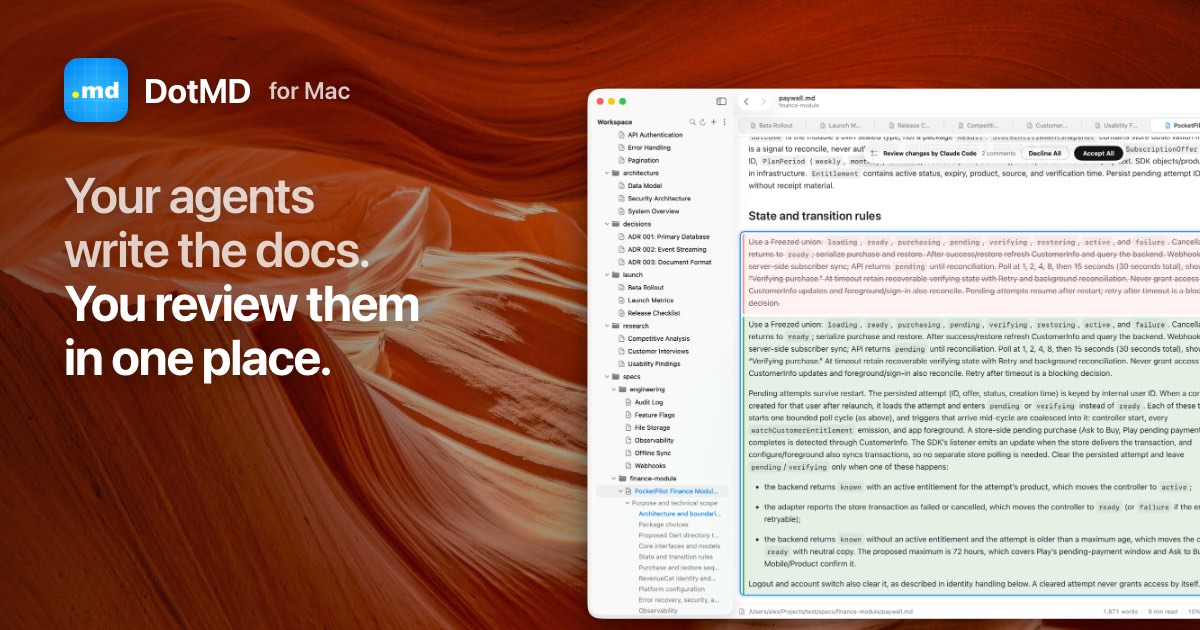
DotMD is a Markdown viewer and editor for macOS that adds a structured review loop to your documents. The application launches on macOS 14 or newer, and a free download is available. While the core editor is free, the Pro version offers a 14‑day trial followed by either weekly, monthly or annual subscription plans handled through RevenueCat. The interface resembles a pull‑request view: comments, suggested changes, and acceptance actions are all embedded in the file itself.
When you open a file, the text is displayed in a standard Markdown preview. Selecting a passage and pressing ⌥⌘M creates an inline comment that includes the exact line numbers and retains the text context. A chat pane on the side lets you send the comment to an AI agent, Claude Code or Codex. The agent processes the request, edits the Markdown, and pushes the updated file back to you. In the editor, the original text is struck out in red, while the revised text appears in green next to the corresponding comment. You can approve individual changes, batch‑approve all, or reopen comments for further refinement. This workflow keeps the review process close to the source file, eliminating the need to switch to separate code‑review tools.
Documents awaiting review are grouped in a “Needs You” list in the left sidebar. The Dock icon displays a badge showing the count of pending items, and a banner at the top of each file indicates its status. This ensures that no file slips through the cracks and that reviewers can rapidly triage their workload. The system is especially useful for teams that rely on AI agents to draft or update documentation, as it lets human editors maintain final control over the content. Conversely, users who only need a lightweight Markdown editor may find the review features unnecessary, and the tool's reliance on macOS 14+ restricts cross‑platform use.
Key features
- Markdown viewing and editing on macOS 14 or newer
- Inline comment attachment with line numbers
- Agent‑powered fixes that return highlighted diffs
- “Needs You” sidebar and Dock badge for pending reviews
- Accept, reopen, or batch‑accept changes directly in the file
- Pro version offers a 14‑day free trial and subscription options
Details
- Pricing
- Free
- Last checked
- 18h ago
- Indexing
- noindex, follow
Suggest an edit
Sign in to suggest an edit.
Pros and cons
Pros
- Direct integration with AI agents for instant fixes
- Inline comments keep context and line references
- Visual diff of changes right beside comments
- Clear navigation of pending reviews via sidebar and badge
- Free base app with transparent subscription options
Cons
- Requires macOS 14 or later
- No publicly listed price details beyond subscription options
- Platform limited to macOS only
- Trial length and cost unclear in the listing
Alternatives
 GitHub CopilotGitHub Copilot review (October 2026): AI coding assistant in your editor and on GitHub, verified Free, Pro, Pro+ and Max plans and AI Credits explained.
 ReplitReplit is a browser-based builder where an AI Agent writes, hosts and publishes full apps from a plain-language description, with database and auth built in.
 Social BellowAI content generator for brainstorming, advice, and interactive conversations.
 CursorCursor review (October 2026): AI-first code editor with agents, verified Hobby, Pro, Pro+, Ultra and Teams pricing, privacy mode, pros and cons.
 SloneekFreelancers use it to keep client work moving, while in-house teams rely on it for consistent output across projects. Either way, the routine parts of ai image generation work get...
 Sourcery SentinelWhat stands out most is predictability. The same input produces dependable output, which matters when you are producing work for clients or publishing on a schedule. Sourcery Sentinel brings a...
 ScrapingdogBuilt for ai coding work, Scrapingdog combines capable AI with straightforward design. It is the kind of tool you can start using immediately. Freelancers use it to keep client work...
 MindstudioYou are not locked into a single way of doing things. Mindstudio supports your existing habits instead of forcing a new one, which makes adoption within a team much smoother....
 WarpWarp pairs a modern terminal with coding agents and cloud agent fleets, with usage included at API rates on its Build, Max and Business plans.
 QodoQodo (formerly CodiumAI) reviews pull requests with multiple AI agents that learn your team's rules, check cross-repo impact and map your services.
 HirelakeaiFreelancers use it to keep client work moving, while in-house teams rely on it for consistent output across projects. Either way, the routine parts of ai recruiting work get faster....
 UpscaylUpscayl is a free, open-source AI image upscaler for Linux, macOS and Windows, with a paid Upscayl Cloud service for browser upscaling, editing and generation.