

EveryGen AI
All-in-one AI creative toolkit for generating images and videos from text or photos.
Sign in to rate this tool.
Overview
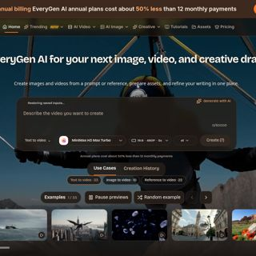
EveryGen AI is a browser‑based creative suite that lets you generate images, short videos, and rewrite text without installing any software. You can start from a written prompt or upload a reference photo, then move between the image, video, and copy tools within the same web app.
The platform offers three main generation modes: text‑to‑image, text‑to‑video, and image‑to‑video. In the video workspace you can select models such as MiniMax H3 Max, which produces 768 p clips with native audio in roughly 2.5 seconds of backend inference for a 5‑second clip. The image workspace supports similar prompt‑driven creation, and you can also use the in‑browser image tools to crop, resize, or adjust assets before exporting. For copy work, a rewrite utility lets you change tone or audience, making it useful for marketing drafts or product descriptions.
Typical users include marketers preparing launch assets, content creators who need quick visual drafts, and writers looking for alternative phrasing. The workflow is divided into four steps: choose the task (image, video, or text), prepare the input (prompt, reference image, or source text), check model settings such as resolution, duration, and audio options, then review the output before downloading. Public example prompts are available on the site, allowing you to copy a prompt and see the associated settings. The tool does not claim fully finished assets; you are expected to review composition, wording, and details before using the result in downstream editing.
EveryGen AI also provides a history view where you can revisit past generations, and a template picker that shows example scenes like “Mountain airglide” or “Zombie Couple.” The interface indicates remaining credits for each request, and the site mentions that annual plans cost about half of twelve monthly payments, though exact pricing numbers are not listed.
Key features
- Text‑to‑image generation from prompts or reference photos
- Text‑to‑video and image‑to‑video creation with selectable models (e.g., MiniMax H3 Max)
- In‑browser image editing tools for preparation and adjustment
- Copy rewriting utility that adapts tone and audience
- Example prompt library and template gallery for quick start
- Generation history and credit display within the web app
Details
- Pricing
- Freemium
- Category
- Image
Suggest an edit
Sign in to suggest an edit.
Pros and cons
Pros
- All three media types (image, video, text) are accessible from a single web interface.
- No installation required; works entirely in the browser.
- Model options include a fast video variant that adds native audio.
- Example prompts help users formulate effective inputs.
Cons
- Pricing details are limited to a relative statement about annual plans.
- Output length for video is capped at short clips (e.g., 5 seconds).
- The site does not list specific limits on image resolution or number of generations per month.
Alternatives
 PixlrPixlr is a free browser photo editor with AI generation, generative fill, upscaling and video and audio tools, plus cheap Plus, Premium and Ultra plans.
 ArtblastaiArtBlast AI is a web platform for creating art with AI.
 AI Photo EditorAI Photo Editor is a browser-based tool that edits photos from a written prompt.
 Image Translator Manga TranslatorTranslateImg is an online AI image translator.
 Cleanup.picturesCleanup.pictures removes unwanted objects, people, text and defects from photos in the browser, free at 720px or full resolution with Pro.
 Patchwork TattoosPatchwork Tattoos is an AI tattoo and image generation tool for exploring patchwork tattoo ideas, sleeve inspiration, filler concepts, and design variations. Users can generate or remix visual tattoo concepts…
 RuncomfyRunComfy is a cloud platform for ComfyUI, the popular node-based interface for running open-source image and video generation models.
 MidjourneyMidjourney review (October 2026): AI image and video generator features, verified Basic to Mega pricing, licensing, pros, cons and alternatives.
 AI Ease AI Photo EditorAI Ease is an online creation platform that brings many AI image and video tools together.
 AI Christmas Photo GeneratorFlux1 AI is a browser-based platform for creating and editing images with the FLUX models, plus video generation.
 AI Product ShotAI Product Shot is a tool for creating product photos and ads with AI.
 SharpniqSharpniq Unblur Image is an online tool for removing blur from images.