

Sign in to rate this tool.
Overview

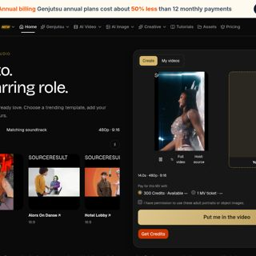
Genjutsu is a web‑based AI video studio that lets you place your own photos into existing short performances. The service focuses on motion transfer, so the original camera movement and timing stay the same while the visual subject changes.
You begin by selecting a trending template that already contains a source video, examples include runway walks, dance clips, or object shots. After watching the source, you upload one clear image for each role you want to replace, such as a portrait for a runway performer or an object for a vehicle template. The interface then guides you through four steps: view the source, add reference photos, choose an output format, and finally compare and download the result from the My videos area.
The tool supports three resolution options, 480p, 720p and 1080p, depending on the chosen workflow, and each generated video lasts up to about 30 seconds, matching the length of the source clip. Formats are presented as portrait (9:16) or field (16:9) and are enabled only when a compatible source exists; disabled formats are shown with an explanation. Credits are used to pay for each completed video, with a single MV template costing 300 Credits. You can purchase credit packs ranging from 800 to 160,000 credits, and unused credits remain valid for 365 days. Failed generations return the reserved credits, and browsing or preparing inputs does not consume any credits.
Genjutsu is aimed at creators who want to quickly produce personalized short videos without filming new footage. It is useful for social media content, fan edits, or promotional snippets where the motion and soundtrack are already appealing and only the visual subject needs to be swapped. Because the workflow relies on a single reference image per role, the output quality depends on the clarity of those inputs, and the system does not guarantee an identical result to the examples shown.
Key features
- Motion‑transfer video generation that keeps source camera movement and timing
- Library of trending templates covering runway, dance, music and object scenes
- Ability to replace subjects with a single clear photo per role
- Output resolutions of 480p, 720p and 1080p, portrait or field formats
- Credit‑based pricing; each full video costs 300 Credits, with packs available for purchase
- Credit refunds for failed generation attempts
Details
- Pricing
- Freemium
- Category
- Video
Suggest an edit
Sign in to suggest an edit.
Pros and cons
Pros
- Clear four‑step workflow makes the process easy to follow
- Wide selection of ready‑made templates for quick start
- Supports both portrait and field aspect ratios
- Credit system allows pay‑as‑you‑go usage without subscription lock‑in
Cons
- Video length limited to roughly 30 seconds per template
- No public pricing information beyond credit packs; actual cost per video depends on credits
- Output quality varies with the reference image; no guarantee of identical results to examples.
Alternatives
 PikaPika is an idea-to-video platform that turns ideas into motion videos.
 TryH3 — MiniMax H3 Video GeneratorTryH3 is an AI video trend studio.
 RollAI-powered platform for studio-quality remote video production using just a phone.
 Stable VideoAI video model transforming images/text into videos.
 MalloyMalloy is a platform to hire top video editors.
 Wan 3 AIWan 3 AI lets fitness coaches generate short movement illustrations with realistic motion to accompany workout plans and posts. Personal trainers and yoga teachers explain movement all day, but filming…
 Krikey AIKrikey AI is an animation tool that creates 3D animations from simple text or video prompts.
 FlickifyaiAI platform to generate viral videos effortlessly and quickly.
 CascadeurCascadeur is desktop 3D character animation software that uses AI and physics to speed up keyframe animation.
 Re Create VideoAI-powered app to recreate viral short-form videos.
 Krikey ComKrikey AI is an AI animation maker for creating 3D animated videos from simple text or video prompts.
 HeyGenHeyGen turns a script into a video with an AI presenter, including avatars built from your own footage and dubbed translations in 175+ languages.