

GoNavi
High-performance multi-data-source database client — ~30MB, AI & MCP ready, zero Electron bloat. | 高性能多数据源数据库客户端:约 30MB,AI 与 MCP 就绪,告别 Electron 膨胀。
Sign in to rate this tool.
Overview
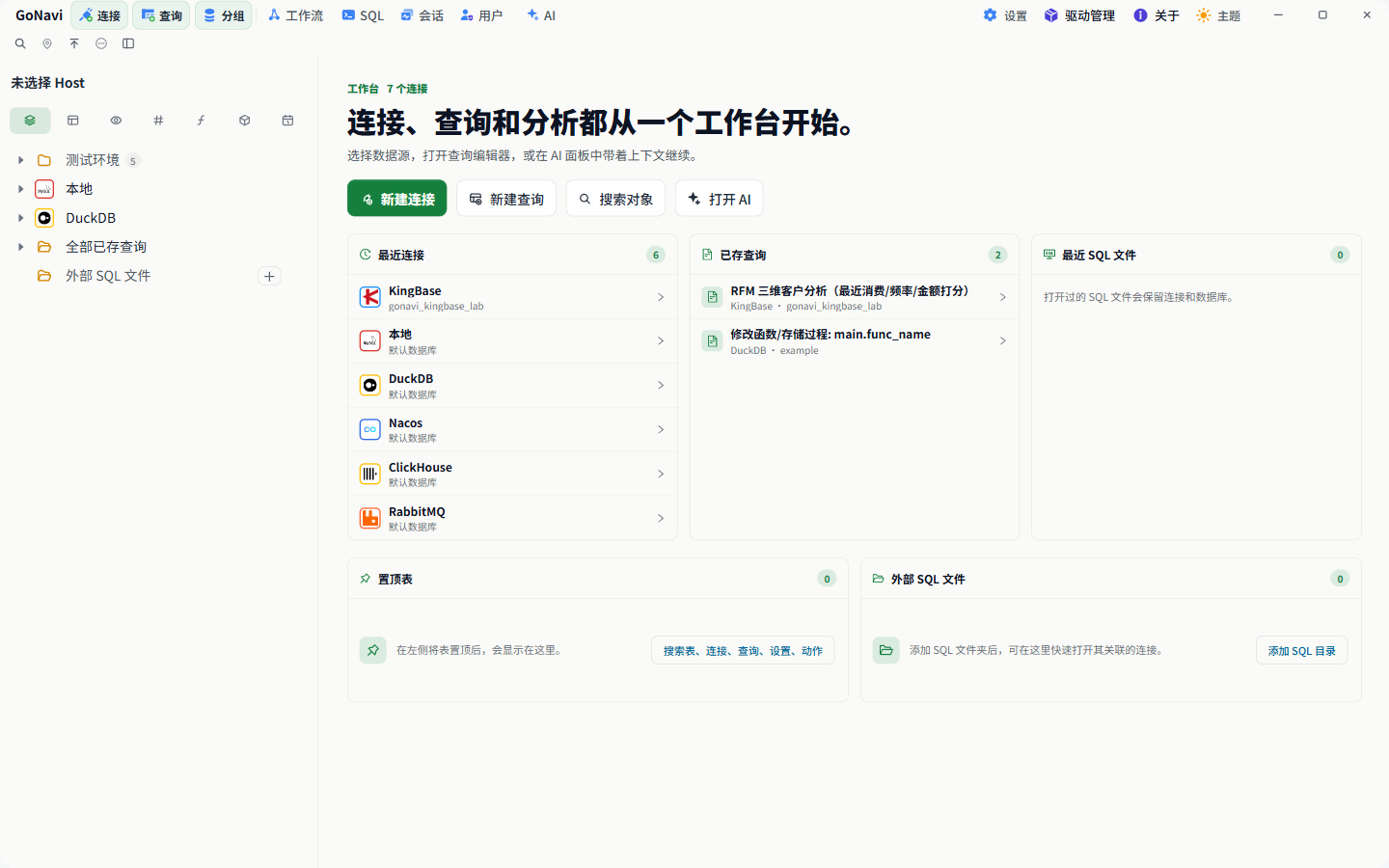
GoNavi is an open‑source, cross‑platform database client that bundles a SQL editor, result viewer and an AI assistant in a single lightweight package. The installer is between 20 MB and 26 MB and runs on Windows, macOS and Linux without relying on Electron, which keeps the download size and runtime memory lower than many comparable tools.
The client supports more than 50 data sources, including MySQL, PostgreSQL, Oracle, Redis, Kafka, MongoDB, ClickHouse and a range of Chinese and open‑source databases. Drivers for the most common sources are built in; additional drivers can be installed on demand or added via a custom driver + DSN configuration. You create connections by selecting a category, searching by name, or pasting a URI, and the same configuration can be exported or imported as JSON for easy sharing between machines.
In the main workspace you write SQL in a Monaco‑based editor that offers autocomplete for schemas, tables and columns. After executing a query, results appear in a virtual‑scroll table that remains responsive even with large result sets. Cells can be edited directly, with changes batched into a transaction that you can commit or roll back. Export options include CSV, XLSX, JSON and Markdown. An execution history panel lets you filter past statements by status or time and re‑inject them into the editor with a single click. All executed statements are recorded in an audit log that is masked by default; you can configure retention periods and export the log if needed.
The built‑in AI assistant can read the current database schema and generate, explain or optimise SQL statements. It works with OpenAI, Gemini, Claude and any service that implements the OpenAI‑compatible API. The AI can insert the generated SQL into the editor for preview before execution, and it never receives the database password, which stays on the local machine. GoNavi also includes an MCP service that lets external coding agents query table structures and, when enabled, run SQL through the same security settings as the AI assistant. A lightweight Web Server version is available for Docker, Kubernetes or Helm deployments, and automatic update checks provide the latest x64 and ARM64 builds.
Key features
- Supports 50 + data sources across relational, NoSQL, time‑series, vector and message‑queue categories
- Native UI built with Go and system WebView, avoiding Electron bloat
Details
- Pricing
- Free
- Category
- Code
Suggest an edit
Sign in to suggest an edit.
Pros and cons
Pros
- Small installer size and lower runtime memory compared with Electron‑based clients
- Wide range of built‑in drivers and ability to add custom drivers on demand
- AI features are tightly coupled to the current schema and keep credentials local
- Audit logging and data masking are enabled out of the box
Cons
- No pricing information is published; the tool is free and open source under Apache‑2.0
- Memory usage still reaches around 400 MB for the main process plus WebKit overhead on Linux
- Some advanced drivers require manual installation, which adds extra steps for less common databases
Alternatives
 ReplitReplit is a browser-based builder where an AI Agent writes, hosts and publishes full apps from a plain-language description, with database and auth built in.
 Qdrant IoQdrant is a high-performance vector search engine and database.
 ClineCline is an open-source coding agent for VS Code, the terminal, desktop and cloud that works with your choice of model provider and your own API keys.
 Kilo AIKilo, also known as Kilo Code, is an open-source AI coding agent.
 GitHub CopilotGitHub Copilot review (October 2026): AI coding assistant in your editor and on GitHub, verified Free, Pro, Pro+ and Max plans and AI Credits explained.
 Maxim AIBifrost is an AI gateway made by Maxim AI.
 CosineCosine describes itself as a sovereign AI lab.
 DynamiqDynamiq is an agentic AI platform for building and running AI agents for back-office automation and customer support, by voice and by chat.
 Faraday AIFaraday is a customer context platform for AI agents and marketing workflows.
 QodoQodo (formerly CodiumAI) reviews pull requests with multiple AI agents that learn your team's rules, check cross-repo impact and map your services.
 Veryfi ComVeryfi provides OCR APIs that extract structured data from invoices, receipts, checks and other financial documents, and also detect fraud.
 Fireworks AIFireworks AI is an infrastructure platform for building with open AI models.