


Sign in to rate this tool.
Overview
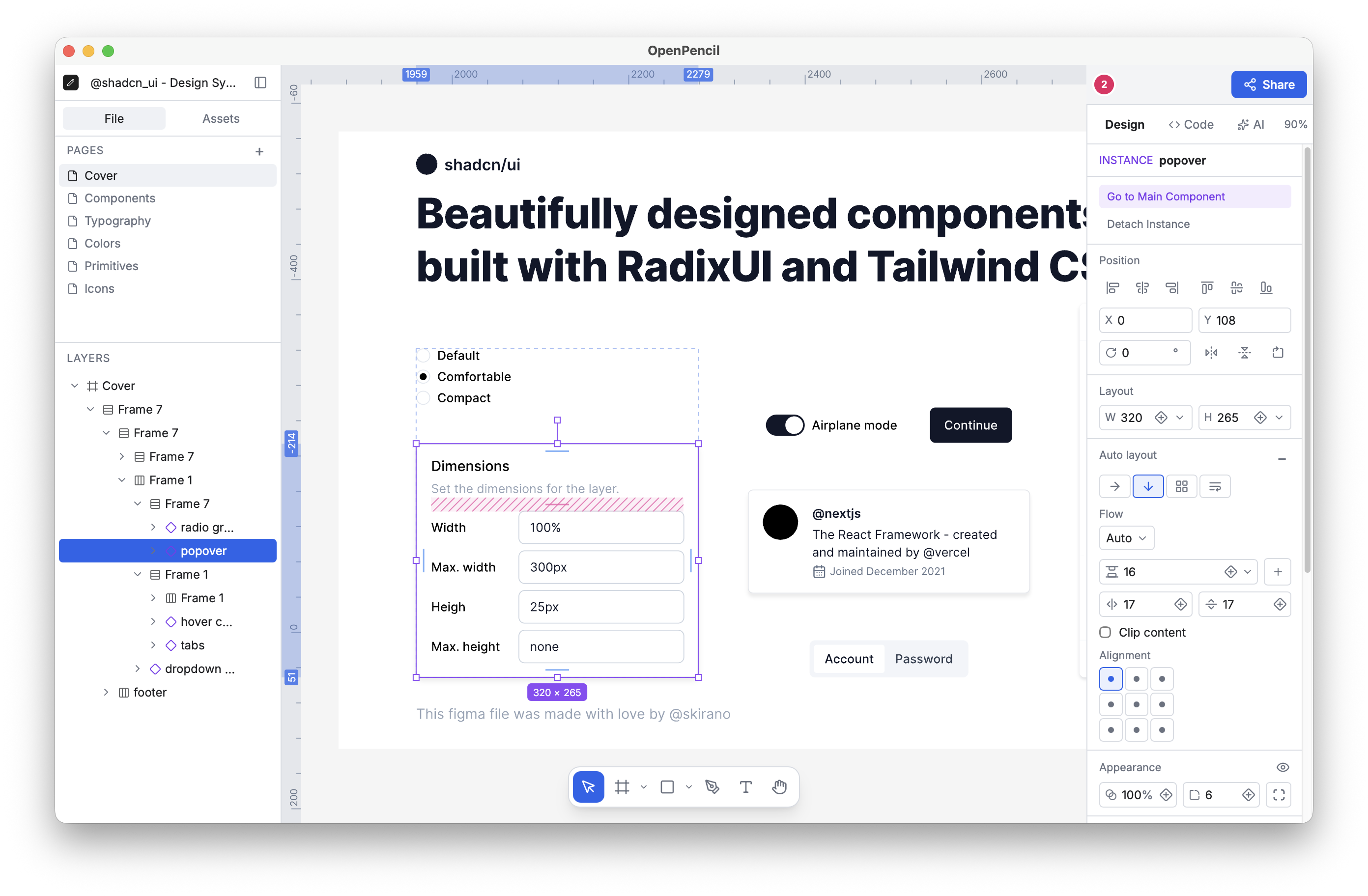
OpenPencil is an open‑source design editor that reads and writes Figma .fig files directly on your machine. It offers the same layers, components, and auto‑layout features you find in Figma, but every action stays local, no server or account is required.
The editor lets you open a .fig file and work with pages, components, instances, variables, and auto‑layout as editable layers. You can also paste SVG or open HTML/CSS, and the content turns into layers that stay laid out as a browser would. Layers can be modified with the usual design tools: constraints, fills, strokes, effects, typography, and importable shader fills from shaders.com. Every change is undoable, and AI agents can drive the same tools in plain language.
When you need to prototype interactions, give a component a behaviour such as a switch, checkbox, slider, tabs, or text field. The preview canvas can play these interactions, letting you drag the progress bar or toggle shuffle. Components can be exported as Vue or React elements, or as design JSX with variables written as tokens. Storybook controls are generated from variants so you can test components directly.
OpenPencil provides a linting system that flags contrast issues, small text, default names, hidden or empty layers, and stray groups. Most problems can be fixed with one click, and the same rules run in the CLI or for agents. The CLI supports 24 commands such as inspect, query with XPath, lint, export, and format conversion. It can drive the GUI app or run headless for CI checks.
Peers can share a link and edit the same document in a peer‑to‑peer environment. Live cursors, follow mode, layer‑pinned comments, and voice calls integrate directly into the canvas. AI agents join the same way, building designs as they stream and letting you see the changes in real time.
OpenPencil ships as a toolkit. Alongside the GUI app, it offers a headless Vue SDK, a scene‑graph package, and file‑format packages. You can embed a canvas in your own product, render designs in CI, or build a custom editor on the same engine. Files stay local, and syncing can be done manually to an S3‑compatible bucket if desired.
Transform all design content to out‑of‑the‑box formats: export to .fig, PDF, PPTX, SVG, HTML, or JSX. The tool is MIT licensed.
Details
- Pricing
- Free
- Category
- Design
Suggest an edit
Sign in to suggest an edit.
Pros and cons
Pros
- Fully local operation with no server dependency
- AI agent integration using plain language commands
- Strong collaboration features for real‑time editing
- CLI provides programmatic control for CI pipelines and automation
- Open‑source licensing allows embedding and extension
Cons
- No published pricing or subscription model
- Limited documentation on beta features such as shader presets
- Synchronization requires manual setup to S3-compatible storage
- Some UI elements only available in preview mode
Alternatives
 AI FrameAI Frame is a plugin for Framer, the website builder, available on the Framer Marketplace.
 BananiBanani is an AI copilot for UI design.
 EraserEraser is an AI tool for creating technical diagrams such as cloud architecture diagrams, business process flows and system designs.
 Canva AICanva Magic Studio review (October 2026): Canva's AI design tools, Magic Write, Magic Edit, Magic Media, plans, AI usage limits, pros and cons.
 RecraftRecraft is an AI design tool that generates true editable vector graphics, builds custom styles from your images and offers Free, Basic, Pro and Teams plans.
 Depix AIDepix calls itself the intelligence layer for product design and marketing.
 Proposal GenieProposal Genie is an AI proposal generator built for freelancers who bid on jobs through Upwork, Fiverr and Freelancer.com.
 RuncomfyRunComfy is a cloud platform for ComfyUI, the popular node-based interface for running open-source image and video generation models.
 JumperJumper is a machine-learning search engine for video footage, built for editors.
 SplineSpline is a browser 3D design tool for interactive scenes, with real-time collaboration, AI agents via MCP and publishing to web, iOS and Android.
 123rf AI Search Engine123RF is a long-running stock content marketplace that combines a large library of licensed media with a suite of AI creative tools.
 Kilo AIKilo, also known as Kilo Code, is an open-source AI coding agent.