


rpaframework
Collection of open-source libraries and tools for Robotic Process Automation (RPA), designed to be used with both Robot Framework and Python
Sign in to rate this tool.
Overview
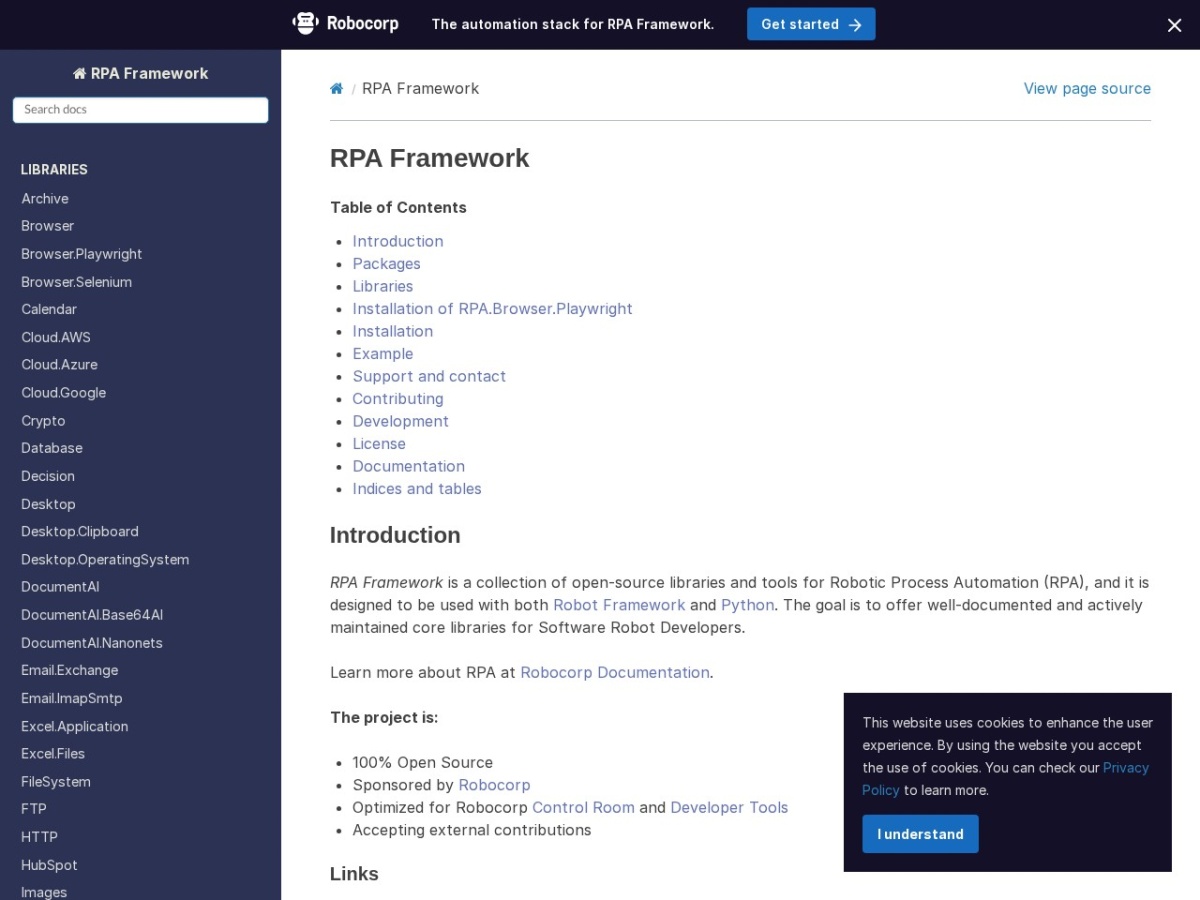
RPA Framework is an open‑source collection of libraries and tools aimed at developers who build software robots. It works with both Robot Framework test suites and plain Python scripts, letting you choose the syntax you prefer. The project is maintained by Robocorp and is available under an open‑source licence, with source code hosted on GitHub.
The framework bundles a wide range of functional libraries, each focused on a specific automation domain. For file handling you have RPA.Archive for TAR and ZIP operations, while RPA.FileSystem lets you read, move, and delete files and directories. Web automation is covered by RPA.Browser.Selenium and the newer RPA.Browser.Playwright, which require a separate installation step because of their size. Cloud services are reachable through RPA.Cloud.AWS, RPA.Cloud.Azure, and RPA.Cloud.Google, each exposing the respective provider's API. Email processing can be done with RPA.Email.Exchange or RPA.Email.ImapSmtp, and document work is supported by RPA.PDF, RPA.Excel.Files, and RPA.Word.Application. There are also specialized libraries for OCR‑based recognition, image manipulation, database access, and interaction with enterprise systems such as SAP, Salesforce, and Microsoft 365 via RPA.MSGraph.
If you are building robots that need to run in Robocorp's Control Room, the framework includes helper libraries like RPA.Robocorp.Process, RPA.Robocorp.WorkItems, RPA.Robocorp.Vault, and RPA.Robocorp.Storage. These give you programmatic access to process orchestration, work‑item handling, secret management, and asset storage inside the Control Room environment. The documentation lists each library with a brief description and indicates whether it is included in the core package or provided as an extra, for example RPA.PDF appears in both the core and the separate PDF package.
Installation is handled through standard Python packaging tools. The default method uses a `conda.yaml` file that specifies Python 3.10, `pip`, and the `rpaframework` package version. To include all optional components, the same file can list additional dependencies such as `tesseract`, `nodejs`, and the Playwright browser driver, followed by a post‑install command `rfbrowser init`. Separate installation commands are also provided for individual extras like `rpaframework-aws`, `rpaframework-pdf`, or `rpaframework-windows`.
Key features
- Over 30 libraries covering browsers, cloud services, desktop automation, and document processing
- Compatible with Robot Framework syntax and native Python code
- Optimized for use in Robocorp Control Room and Developer Tools
- Open‑source codebase with contribution guidelines on GitHub
- Installation via `conda.yaml` with optional extras for full feature set
- Detailed documentation and release notes hosted on rpaframework.org
Details
- Pricing
- Free
Suggest an edit
Sign in to suggest an edit.
Pros and cons
Pros
- Broad coverage of automation tasks reduces the need for third‑party packages
- Clear separation of core and optional libraries simplifies dependency management
- Official support for both Selenium and Playwright browsers
- Integrated helpers for Robocorp's cloud platform simplify deployment
Cons
- Some libraries (e.g., Playwright) require a special installation process and additional system dependencies
- Pricing information is not published because the project is free and open source
- No single‑click installer; users must configure a `conda.yaml` or pip environment themselves
Alternatives
 SnowballAI-powered X (Twitter) growth and monetization tool for content creators and brands.
 ScrapingdogScrapingdog is a web scraping API for extracting data from websites at scale.
 AdminforthAdminForth is an open-source, self-hosted framework for building back-office and admin panels, released under the MIT license.
 OpensilverOpenSilver is an open-source framework for building web applications with C# and XAML, as used by WPF and Silverlight.
 Talkatoo ComTalkatoo is AI scribe, dictation and assistant software built for veterinary practices.
 Digits Accounting ReimaginedDigits is accounting software built around AI.
 AI Cartoon GeneratorAI Cartoon Generator is a web tool that creates cartoon, anime and manga-style images from text descriptions.
 MindstudioMindStudio is a platform for building powerful AI agents for yourself, your team or your enterprise without coding.
 DynamiqDynamiq is an agentic AI platform for building and running AI agents for back-office automation and customer support, by voice and by chat.
 Coefont CloudAI Voice Hub offering text-to-speech, voice changing, and AI voice creation.
 TavilyTavily is a search engine built for AI agents and large language model applications.
 JumperJumper is a machine-learning search engine for video footage, built for editors.