


sokuji
Real-time two-way speech translation for bilingual meetings — auto-detects the spoken language and translates both directions, cloud or fully offline on-device.
Sign in to rate this tool.
Overview
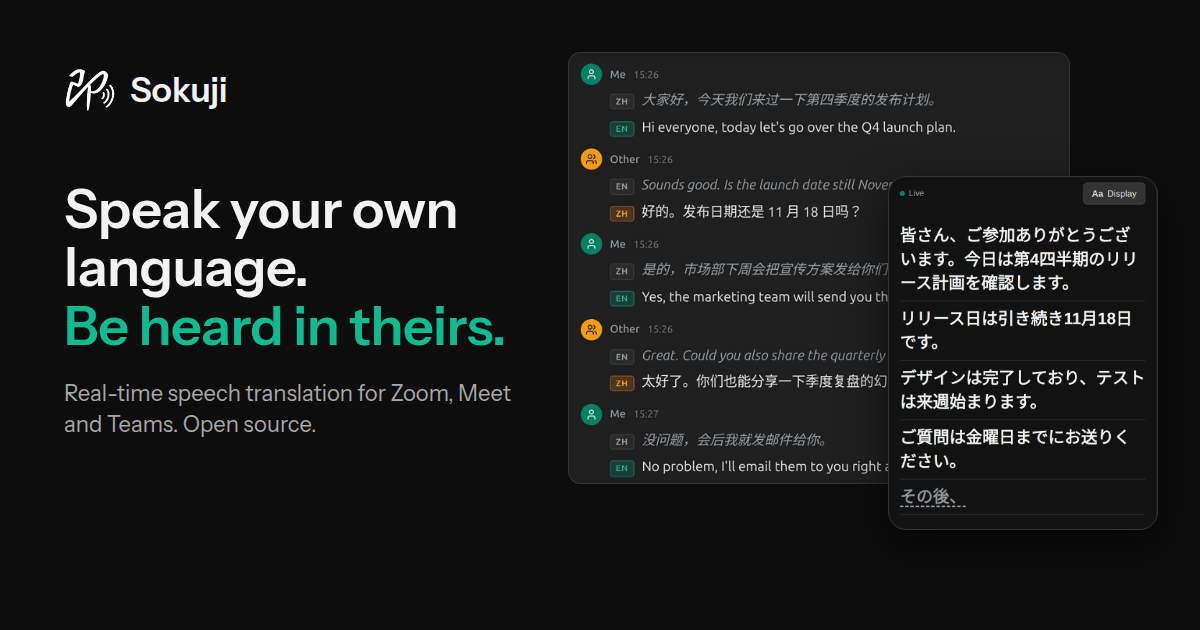
Sokuji is a real‑time translation tool that acts as a virtual microphone. It lets you speak in your native language and have your words translated into the language of the other participant or meeting platform. The recipient hears the translation through the meeting app, while the speaker gets subtitles or spoken output back in their own language.
The desktop application registers itself as an ordinary microphone in the operating system. This means any software that can select a microphone, Zoom, Google Meet, Microsoft Teams, Slack, Discord, Jitsi Meet, Whereby, Gather, Yandex, Telemost, or even games and streaming programs, can use Sokuji without extra configuration. The app also monitors the system audio, so video or recorded content can be subtitled in real time. The browser extension works only on supported web meeting sites, offering the same virtual microphone functionality within the browser tab. No audio routing or external hardware is needed; the tool operates entirely on the user's machine.
Sokuji supports two‑way conversation. When you speak, the tool translates your voice to the target language and plays it back to the meeting participants. Incoming speech from the other side is translated into your language and presented as subtitles or read aloud. Users can choose to receive only subtitles, only whispered speech, or both. Multiple translation modes are available: full voice translation, subtitle‑only, or a mix where you hear the translation and see the original text. The tool adapts the speech rate to keep the translated audio in sync, and it uses semantic turn detection to avoid cutting off speech mid‑sentence.
The application is free and open source. It runs fully on device without a subscription, and it works offline once the GPU‑optimized inference engine is downloaded. The tool can also record a short clip to preserve the user's natural voice in the translation, choosing from a library of synthesized voices provided by the platform.
Key features
- Virtual microphone that appears as a standard audio input on the system
- Two‑way translation for spoken dialogue in real‑time
- Subtitle overlay that can be drag‑ and resize‑able
- Supports desktop and browser usage across major meeting platforms
- Offline operation with GPU‑optimized inference engine
- Adaptive speech speed and semantic turn detection
Details
- Pricing
- Free
- Category
- Voice
Suggest an edit
Sign in to suggest an edit.
Pros and cons
Pros
- No extra installation required on meeting participants' side
- Works across a wide range of applications and platforms
- Offers both audio and subtitle outputs in either direction
- Open‑source, free to use with no subscription fees
- Offline support when the inference engine is available
Cons
- Web browser extension limited to certain meeting sites
- No published pricing information for enterprise use
- Requires a compatible GPU for best offline performance
- Limited documentation on voice library options for specific providers
Alternatives
 Coefont CloudAI Voice Hub offering text-to-speech, voice changing, and AI voice creation.
 SpeechpulseSpeech recognition and translation software for real-time typing, transcription, and subtitle generation.
 GowhisperPrivacy-focused desktop app for local audio transcription.
 PinchReal-time AI voice translation for video conferencing in 30+ languages.
 Wiz WriteWizWrite is an AI dictation and voice-to-text app.
 Lucida AILucida AI is a language learning app built around one principle: speaking a language out loud, again and again.
 ElevenLabsElevenLabs review (October 2026): AI voice generation, voice cloning, dubbing and speech-to-text, verified plan prices from Free to Business.
 Voicv Voice CloningAI-powered voice cloning, text-to-speech, and speech-to-text platform.
 SpeakpalSpeakPal is an AI language tutor for practising real conversations.
 ScriptmeAutomatic transcription and subtitle platform with AI-powered tools and multi-format support.
 Hume AIEmpathic AI for voice and expression with emotional intelligence.
 ReccloudRecCloud is an online AI toolkit for processing audio and video.