


dontbemichael
A local multi-agent harness that works with your existing Claude Code, Codex subscriptions, allows you to run an office of agents
Sign in to rate this tool.
Overview
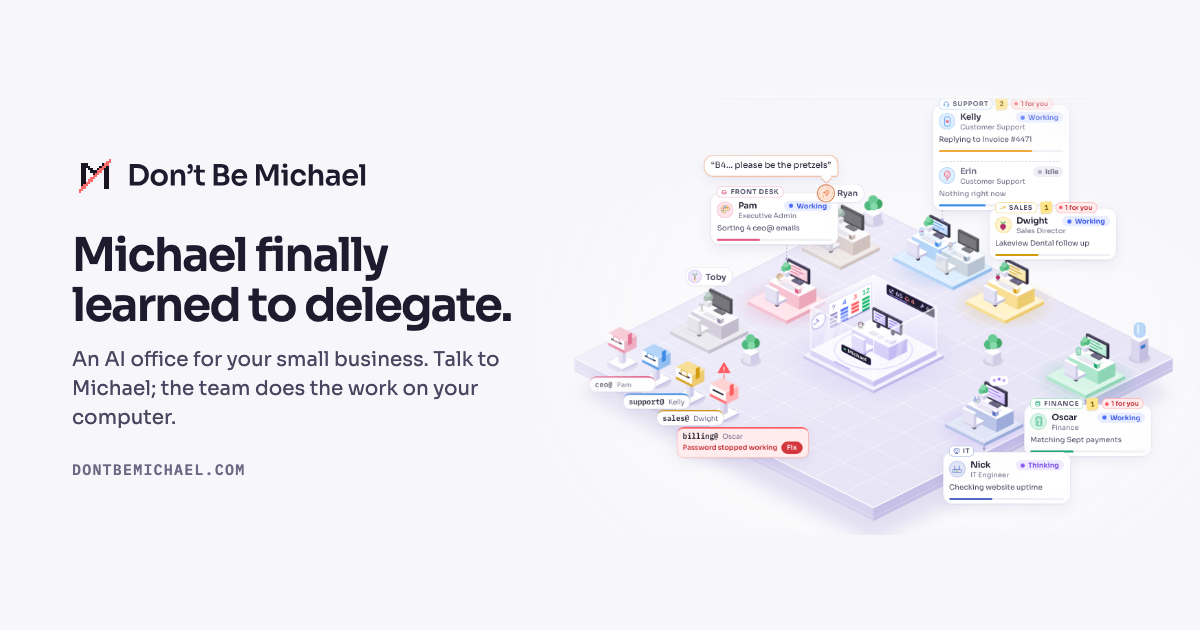
A free, open‑source AI office app for Mac and Windows, Don't Be Michael lets small businesses run common tasks with a virtual team. The interface is a single screen that shows each department's pod, a mailbox column and a board with tasks that need your response.
You start by telling the app what type of business you run, restaurant, retail shop, professional services, home services, SaaS, or any other category. The app then suggests a starter team of AI agents that cover finance, administration, customer support, sales, marketing, HR, IT, supply chain, inventory, shipping, and quality. You can accept the suggested agents or choose additional ones. When you hit “setup,” the application installs the needed components, signs you in, and gives you a ready‑to‑use office within about three minutes.
The main agent is Michael, the office manager. He hands out work to the other agents and checks in only when something requires your confirmation. Email handling is delegated to the Admin agent, Pam, who watches the inbox and routes messages. Oscar, the finance agent, tracks invoices and retainers, flags overdue payments and warns of filing deadlines. Kelly, the customer‑support agent, drafts replies that sit as drafts until you approve them. Dwight, the sales director, manages leads and follow‑ups, and Ryan handles marketing outreach. The IT agent, Sadiq, safeguards client information, while Pete does web research behind a trust layer that never exposes your files to the internet.
All data, agent memory, inbox passwords, and output, is stored locally. The app does not send usage data, and because the code is MIT licensed, anyone can review the logic. The task board shows three columns: To Do, Doing, and Done. When an email or a form comes in, it appears under “To Do” with a label indicating the agent that will handle it. Once an agent finishes its part, the task moves to “Doing”; the prepared draft or report appears in the mailbox column, waiting for your approval.
Key features
- Customizable AI agent pods for every department
- Local storage of all credentials and agent memory
- Trust layer that restricts web‑research agent Pete from accessing client files
- Unified task board with status columns
- Draft‑mode email replies that await user confirmation
Details
- Pricing
- Free
- Category
- Business
Suggest an edit
Sign in to suggest an edit.
Pros and cons
Pros
- Free and open source with MIT license
- Works offline; all sensitive data stays on your computer
- Quick start: ready team in about three minutes
- Clear task visibility on a single board
Cons
- No published pricing (it is free)
- Limited to the department pods listed on the site
- Requires manual approval for each drafted email or report
Alternatives
 DynamiqDynamiq is an agentic AI platform for building and running AI agents for back-office automation and customer support, by voice and by chat.
 Cheers Yc S24Cheers: NFC-enabled badges for in-person business, streamlining reviews, feedback, and employee management.
 EnconvoEnconvo is an AI agent for macOS that lives across your Mac.
 Claude AIClaude review (October 2026): Anthropic's AI assistant, key features, verified Free, Pro, Max and Team pricing, pros, cons and alternatives.
 DeepSeekDeepSeek is a China-based AI lab with a chat assistant (no advertised subscription) and a low-cost developer API offering a reasoning mode and a 1M-token context window.
 AdminforthAdminForth is an open-source, self-hosted framework for building back-office and admin panels, released under the MIT license.
 ChatGPTChatGPT review (October 2026): features, verified Free, Go, Plus and Pro pricing, who it suits, pros, cons and alternatives on AIMAPER.
 Google GeminiGoogle Gemini review (October 2026): features, verified Free, AI Plus, AI Pro and AI Ultra pricing, who it suits, pros, cons and alternatives.
 GowhisperPrivacy-focused desktop app for local audio transcription.
 KimiKimi is Moonshot AI's assistant built on the K3 model, with agent modes for slides, docs, sheets, research and website building.
 GlideGlide (GlideOS) turns your existing spreadsheets into internal business apps and agents, with SheetSense reading formulas and data before it builds.
 Kilo AIKilo, also known as Kilo Code, is an open-source AI coding agent.