


minutes
Open-source, local-first Granola/Otter alternative that Claude Code, Codex, Cursor, and any MCP client can query. Meetings, calls, and voice memos transcribed o
Sign in to rate this tool.
Overview
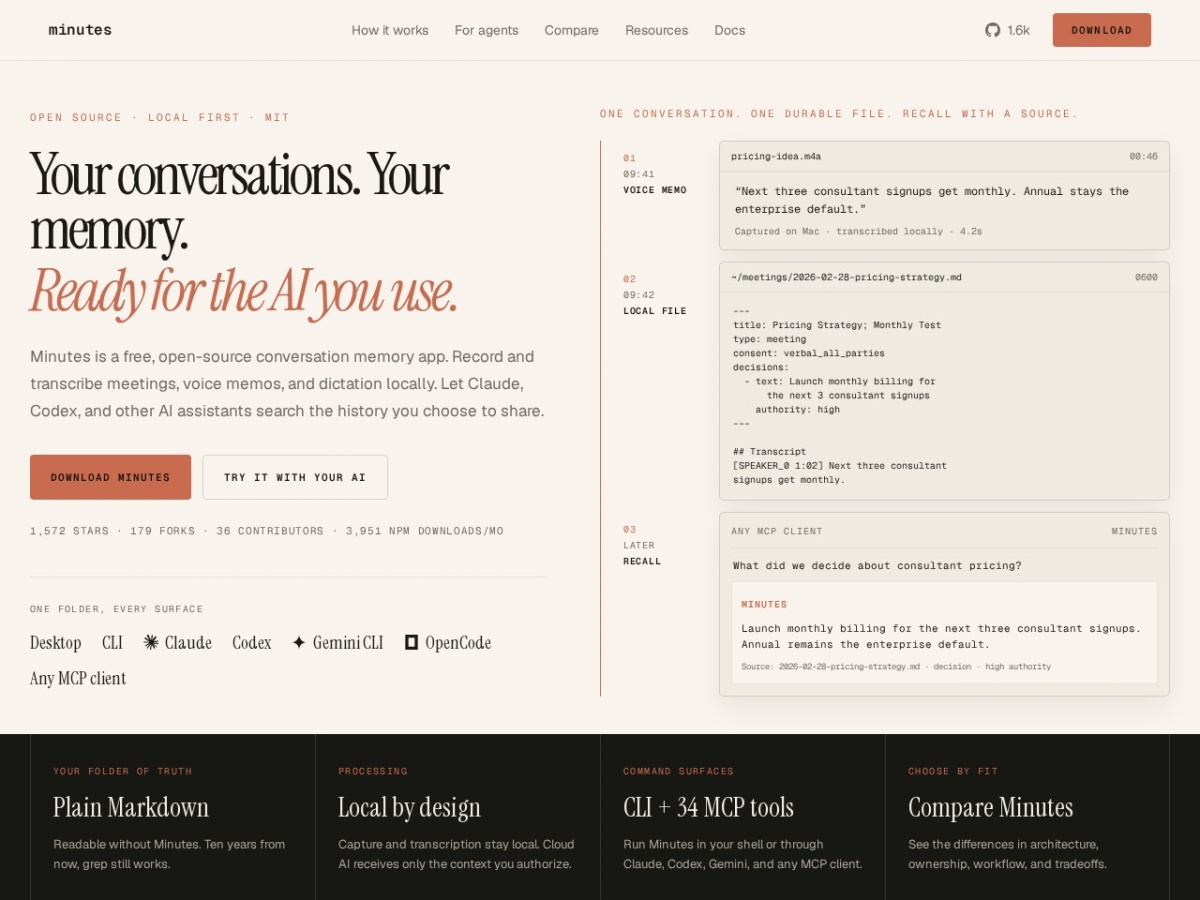
Minutes is a free, open‑source app that records meetings, voice memos and dictation, then transcribes them on your own computer into plain Markdown files. The tool runs locally, so no account, API keys or subscription are required, and the resulting files stay on the disk you control.
The core workflow is simple: you press a hotkey, speak, and Minutes captures the audio, runs a local speech model, and writes a Markdown document that includes timestamps, speaker labels, action items and decisions. The file is saved in a folder you choose, for example ~/meetings/2026‑02‑28‑pricing‑strategy.md, and can be opened with any text editor. Because the output is ordinary Markdown, standard tools like grep or your favorite IDE can search it without needing a proprietary workspace.
Minutes is aimed at users who want to keep a searchable, self‑hosted record of conversations for later use by AI assistants such as Claude, Codex, Gemini or any MCP‑compatible client. After a transcription is saved, you can invoke an AI client to query the file, retrieve specific decisions, or ask “What did we decide about consultant pricing?” The AI only receives the snippet you authorize, preserving the rest of the conversation on your machine. The app provides both a desktop GUI for macOS (Apple Silicon) and Windows, and a command‑line interface that can be installed via Homebrew or npm, allowing integration into shell scripts or other tooling.
The project ships with a demo mode that runs five bundled meetings through the pipeline, and on Apple Silicon it can install NVIDIA's Parakeet v3 model with one click. Transcription speed is reported as 51 ms per typical clip on the Parakeet model, compared with 168 ms for Whisper‑small on the same hardware. Minutes also supports a “daily‑note” mode that appends dictation to a running note file, and it can export a single durable Markdown file that includes all raw transcript data, timestamps and extracted actions.
Key features
- Local‑only audio capture and transcription, no cloud upload by default
- Output written as plain Markdown with timestamps, speakers, actions and decisions
- Compatible with Claude, Codex, Gemini and any MCP client for AI‑driven search
- Desktop GUI for macOS and Windows, plus CLI installable via Homebrew or npm
- One‑click install of NVIDIA Parakeet v3 on Apple Silicon for faster transcription
Details
- Pricing
- Free
- Category
- Meetings
Suggest an edit
Sign in to suggest an edit.
Pros and cons
Pros
- No external accounts or subscription fees required
- Files remain on your own disk, giving you full ownership and long‑term readability
- Works with a range of AI assistants through the MCP interface
- Provides both graphical and command‑line entry points
Cons
- Requires a compatible Mac (Apple Silicon) or Windows machine; no native Linux GUI listed
- Pricing information is not disclosed because the product is free and open source
- Limited to Markdown output; other formats are not mentioned
- Installation relies on third‑party Homebrew taps, which may need manual trust steps.
Alternatives
 Fireflies.aiFireflies.ai records Zoom, Meet and Teams calls with a bot or app, then delivers searchable transcripts, summaries and action items.
 Read Speaker CoachRead AI is a meeting assistant that records and summarises online meetings, then helps you act on what was decided.
 AI Webcam Effects For Video MeetingsWebcam Effects is a browser extension that adds AI video effects to your webcam in any browser-based video call or stream.
 Otter AIOtter.ai review (October 2026): AI meeting notetaker for Zoom, Teams and Meet, verified Basic, Pro and Business pricing, language support and privacy tips.
 Clipto ComAI-powered media management assistant with transcription, video editing, and asset management tools.
 Linkly AILinkly AI is a desktop app that turns the files on your computer into a private knowledge library that AI assistants can search.
 Znote AIZnote is a desktop Markdown editor that works with your own .md files stored locally.
 ClaapClaap is an AI platform for revenue teams that turns every meeting, call and email into trusted data.
 GowhisperPrivacy-focused desktop app for local audio transcription.
 Good TapeAutomatic transcription service for audio and video files, focusing on speed and accuracy.
 Mindmap AI AppMindMap AI is an AI mind map generator that builds maps from your own content.
 Voicetype AIAI-powered dictation app that transcribes, edits, and auto-formats speech into text.