


Sign in to rate this tool.
Overview
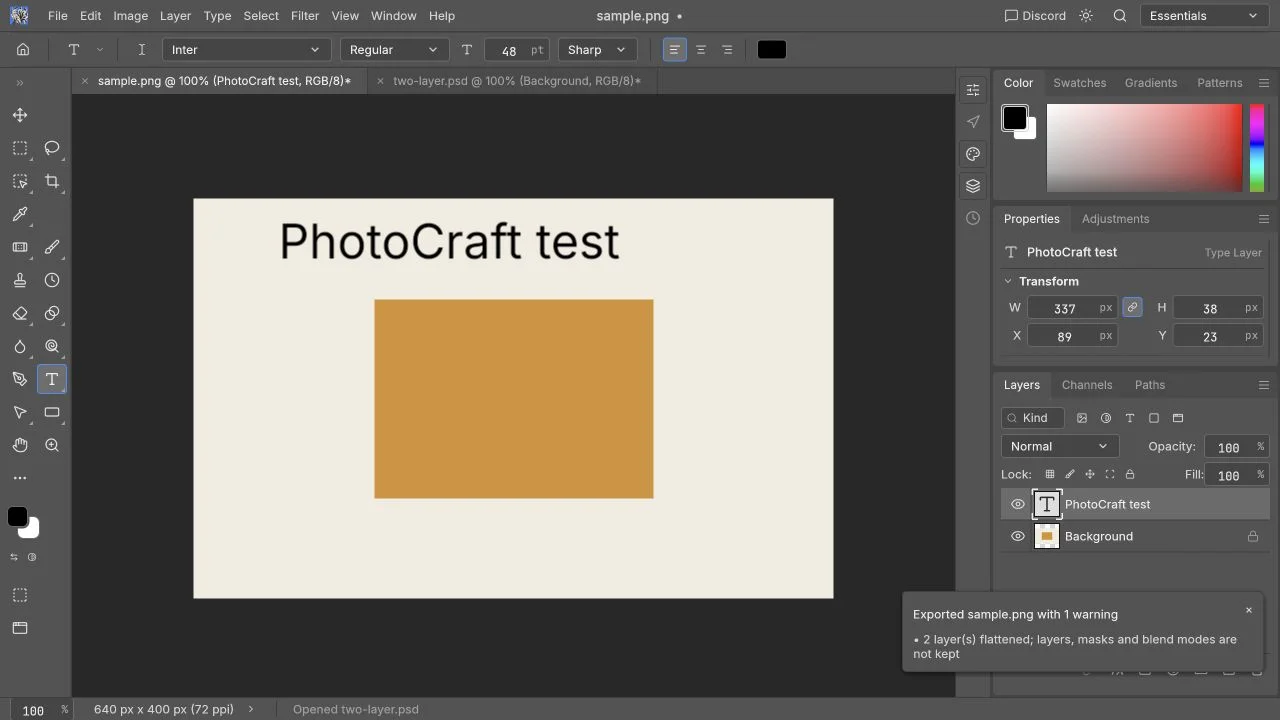
PhotoCraft Online is an open‑source editor that runs directly in the browser. It lets you load JPEG, PNG or PSD files, perform basic edits, and download the result, all without signing up. The current release is 0.5.0 and is presented on a site that hosts tutorials in both English and Chinese.
You begin by opening a small image or PSD through the “Open” button. The editor shows the image in its original dimensions; if a PSD is loaded, each layer appears in the layer panel with its name and order. To edit a layer, you select it, choose a tool such as crop or text, and then apply the change. The undo button reverts the last action. After you finish, you click “Download” and select PNG or JPEG. PNG exports merge all visible layers into one file, so the original PSD must be saved elsewhere if future edits are needed. The site's guides demonstrate checking the exported file's dimensions and checking that the text matches the intended font.
Photography hobbyists or designers who need quick adjustments, like cropping a photo or adding a caption, will find this tool useful. It also helps PSD template reviewers verify that fonts, layer opacities and basic effects export correctly. It is not suited for complex Photoshop workflows: smart objects, vector masks, large print files, or advanced channel and adjustment layer operations may not be handled reliably. The site notes that generative AI options are not present on the online version and that performance on mobile or very large PSDs has not been tested.
The editor requires an up‑to‑date desktop browser that supports WebGPU or WebGL2; the first load may take longer as the application assets download. No cloud storage is used; all processing remains in the browser, and the only network requests are for ordinary page resources. The site provides tutorials and a beginner guide but does not publish pricing, API access, or integration details.
Key features
- Crop images and add text directly in the browser
- Inspect and modify individual layers in PSD files
- Export edits as PNG or JPEG with merged layers
- Guides available in English and Chinese
- Works without account or cloud storage
- Supports WebGPU/WebGL2 for rendering
Details
- Pricing
- Free
- Category
- Photography
Suggest an edit
Sign in to suggest an edit.
Pros and cons
Pros
- Completely free, no account needed
- Browser‑based; files remain local
- PSD layer inspection and basic editing
- Multilingual help resources
Cons
- Does not replace full Photoshop functionality
- No built‑in generative AI features
- No published pricing or advanced support
- Performance on large files and mobile not confirmed
Alternatives
 AI Photo EditorAI Photo Editor is a browser-based tool that edits photos from a written prompt.
 Stable VideoAI video model transforming images/text into videos.
 AI Ease AI Photo EditorAI Ease is an online creation platform that brings many AI image and video tools together.
 PhotoshootPhotoshoot turns 1–3 everyday photos into polished AI professional headshots and portraits for LinkedIn, resumes, and personal branding. Natural skin, studio-quality light, and a high-resolution finish—fast and privacy-friendly.
 PebblelyPebblely turns plain product photos into styled scenes with 100+ templates and custom prompts, on Lite, Basic and Pro monthly image plans.
 ClaidClaid is an AI product photography suite for scenes, fashion models, video and enhancement, with a strong API and Free, Essentials, Pro and Business plans.
 OptivizioAI photo generator for professional-quality visuals.
 LensaLensa by Prisma Labs is a mobile photo editor with one-tap trend effects, beauty tools, an AI eraser and enhancer, hair try-on and presets.
 Image to Claymation AI GeneratorImage to Claymation is an online tool that converts an ordinary photo into an image that looks sculpted from modelling clay.
 PixlrPixlr is a free browser photo editor with AI generation, generative fill, upscaling and video and audio tools, plus cheap Plus, Premium and Ultra plans.
 BrandmarkBrandmark is an AI logo maker with free unlimited logo generation and one-time packages from $35 that include vector files and brand assets.
 Photo RestorePhotoRestore is an online AI tool for restoring old family photographs.