


pipeshub-ai
The open-source context layer for AI agents. PipesHub turns your company's knowledge (Slack, Drive, Jira, GitHub, Microsoft 365 and 40+ connectors) into a permi
Sign in to rate this tool.
Overview
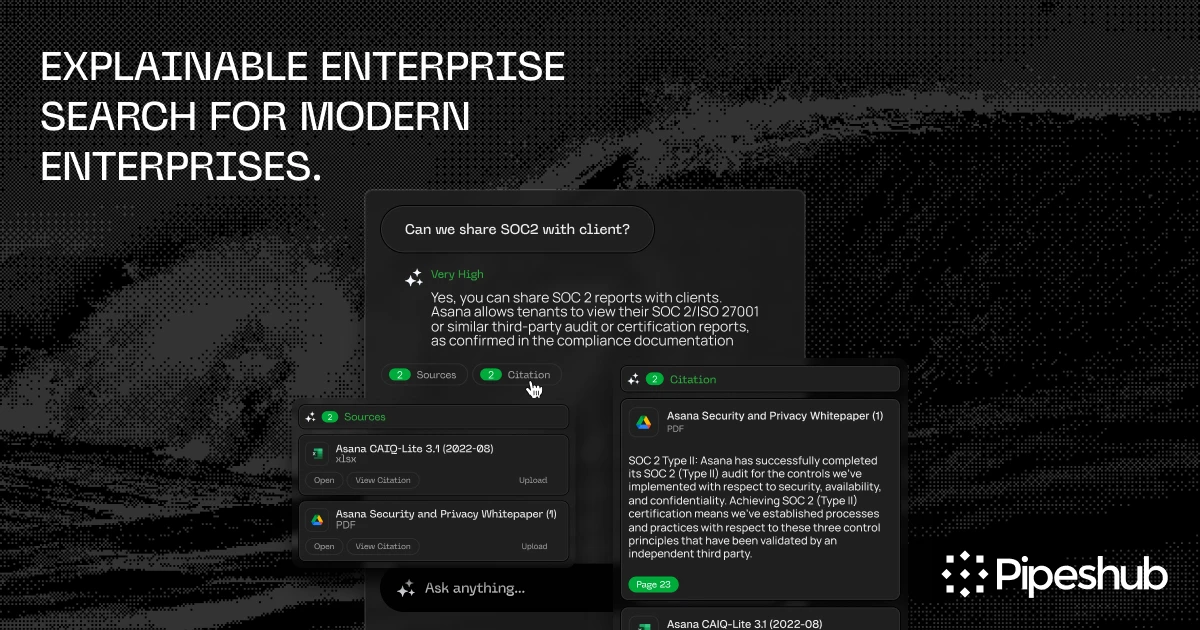
PipesHub is an open‑source platform that turns a company's internal content into a single, searchable workspace for AI agents. It pulls data from Slack, Microsoft 365, GitHub, Google Drive, Notion and more than 40 other connectors. The goal is to give agents a trusted source of information that also shows where each piece came from.
You begin by configuring the connectors that match your organization's tools. PipesHub then builds a permission‑aware index of every file, conversation, and document. Each record in the index keeps the original URL or ID, the owning user or group, and any access policies that apply. When you ask an agent a question, the system searches that index, respects your access rules, and returns the best matches. The agent's answer is accompanied by a citation that links back to the exact Slack message, GitHub pull request, or Drive spreadsheet you asked about. That is useful for compliance teams that need to trace every claim to its source.
The tool is best for teams that work across multiple business systems and need AI that can dig into that mix. If most of your knowledge lives in chat and document tools, PipesHub lets you ask one prompt and get information from several places at once. The platform runs on your own infrastructure, so you keep control of any sensitive data. The listing does not mention whether an on‑premises or cloud‑only deployment is required, what hardware requirements the indexing process has, or how long it takes to build the initial index.
PipesHub's user interface is a lightweight command line or web console. You paste a natural‑language request, such as “Show me the latest pull request that mentions bug 123” or “Summarize the last team meeting in #general.” The agent returns the answer, a clickable citation, and a link to the source document. The agent does not offer advanced editing or real‑time collaboration features; it focuses on retrieval and summarization. The software does not disclose which AI model powers the agent or whether you can plug in a different model.
The listing does not provide a pricing structure, subscription tiers, or information about available integrations beyond the stated connectors. It also does not cover how the platform handles model updates or compliance certifications.
Key features
- Open‑source, enterprise‑ready workplace AI platform
Details
- Pricing
- Free
- Last checked
- 20h ago
- Indexing
- noindex, follow
- Category
- Business
Suggest an edit
Sign in to suggest an edit.
Pros and cons
Pros
- Fully open‑source, eliminating vendor lock‑in
- Supports a broad range of popular business tools
- Maintains a permission model, ensuring sensitive data stays restricted
- Provides citations for audit trails
Cons
- No published pricing or subscription information
- Limited public detail on deployment or scaling requirements
- Listing does not mention model selection or update policies
Alternatives
 Credo AIThere is a deliberate calm to how Credo AI works. Loading screens are short, buttons do what they say, and your work is saved where you expect it to be....
 SpellbookFreelancers use it to keep client work moving, while in-house teams rely on it for consistent output across projects. Either way, the routine parts of ai business work get faster....
 Cheers Yc S24Cheers: NFC-enabled badges for in-person business, streamlining reviews, feedback, and employee management.
 DynamiqYou are not locked into a single way of doing things. Dynamiq supports your existing habits instead of forcing a new one, which makes adoption within a team much smoother....
 Trumpettrumpet enhances buyer journeys with personalized microsites and analytics to drive revenue.
 CustomgptIf ai chatbots tasks are part of your routine, Customgpt is worth testing against your own use cases. Their website, customgpt.ai, has the full details. Collaboration hooks are there too...
 Claude AIClaude review (October 2026): Anthropic's AI assistant, key features, verified Free, Pro, Max and Team pricing, pros, cons and alternatives.
 LitellmThe tool has been refined through real use. Settings, history, and templates are organized so repeat work takes less effort each time. Litellm brings a fresh take on ai education...
 GensparkGenspark is an AI workspace with agents for slides, sheets, docs, email, design, code and media, plus plugins for Google Workspace and Microsoft 365.
 Blend EdBlend Ed appears in the ai education category of...
 Linkly AIYou will find a free plan, making it easy to test the tool against your own needs first. The practical way to judge it is to use it. The design...
 DartYou are not locked into a single way of doing things. Dart supports your existing habits instead of forcing a new one, which makes adoption within a team much smoother....