


Binary Translator
Free online binary translator: paste binary code to get text, or type text to get binary. Instant, private, in your browser.
Sign in to rate this tool.
Overview
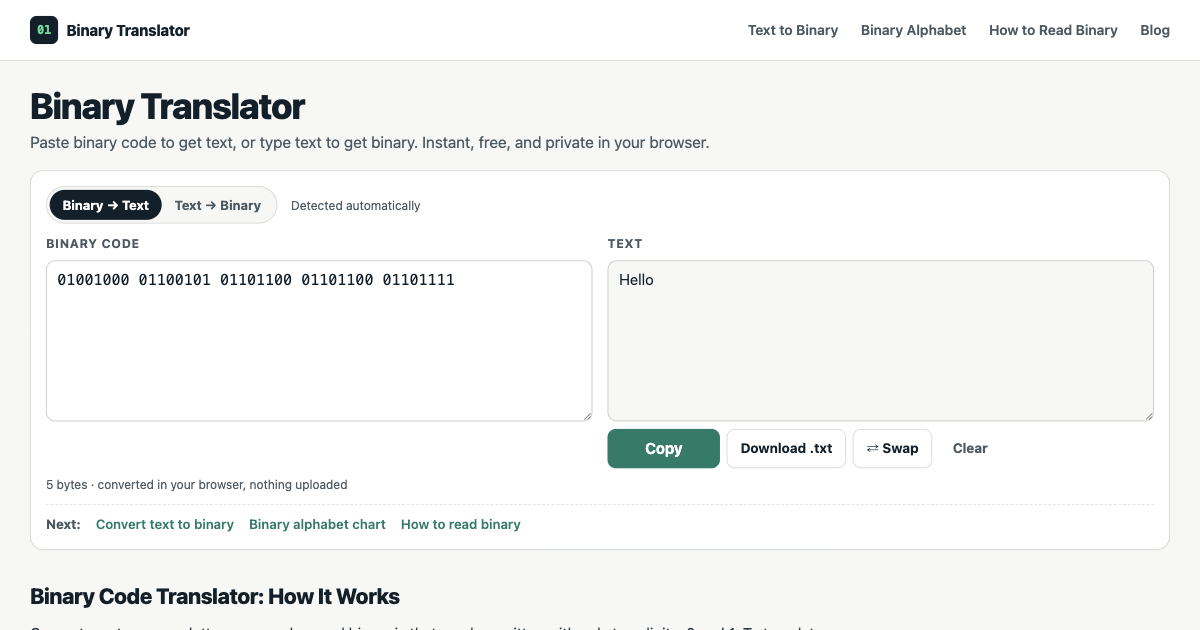
Binary Translator is a free, in‑browser solution that converts binary code into readable text and vice versa. The conversion is carried out instantly, with no data sent to a server, and the output can be copied or downloaded as a plain text file.
The tool first detects whether the input is binary or text. For binary, it examines the string for groups of eight bits (or seven bits for ASCII) and splits them into bytes. Each byte is interpreted as a number between 0 and 255, then read as UTF‑8. If the binary comes in 7‑bit groups, the translator automatically interprets it as ASCII. When text is entered, the tool simply encodes each character to its 8‑bit (or 7‑bit for ASCII) binary equivalent. The interface provides a “Swap” button that reverses the conversion in a single click, allowing quick double‑checking.
Error handling is an explicit part of the workflow. When a binary group is missing a digit or contains a character other than 0 or 1, the translator flags the exact byte and position that caused the problem. For example, if a group has only seven bits, the tool will indicate which byte is short and why the subsequent bytes shift. Spaces in the wrong place, such as an accidental comma or line break, are also detected; if the total digit count divides evenly by eight, the reference layout is shown. This feature is particularly helpful for students verifying hand‑written conversions or hobbyists debugging binary clues in puzzles.
In addition to the converter, the page supplies an alphabet chart that lists binary strings for A–Z, a–z, and digits 0–9. A step‑by‑step guide explains the binary place values and how to read each byte, illustrating common errors like misplaced spaces or omitted digits. A practice box lets users paste their own binary sequence to see how the guide applies. These educational resources make the tool useful for introductory computer science courses, puzzle enthusiasts, and anyone needing to confirm the integrity of a binary message before printing or engraving it.
The listing does not provide any pricing information, subscription plans, or API access. It also does not describe support for non‑ASCII characters beyond the brief mention that UTF‑8 can handle accents, other alphabets, or emoji, which require multiple bytes.
Key features
Details
- Pricing
- Free
- Last checked
- not yet
- Indexing
- index, follow
- Category
- Code
Suggest an edit
Sign in to suggest an edit.
Pros and cons
Pros
- Instant, client‑side processing keeps data private
- Precise error messages aid troubleshooting of manual conversions
- Simple, single‑page interface with all required tools
Cons
- No explicit pricing or subscription details are disclosed
- Limited to binary and text conversions, no advanced format support
- No API or programmatic integration options mentioned
Alternatives
 Js2tsRather than chasing every possible feature, Js2ts picks the ones that matter and does them well. That restraint is noticeable the first time you open it. For a straightforward look...
 MacgptSmall operations appreciate the low setup cost, and larger teams value the consistency. Both end up spending less time on busywork and more on the actual result. Plenty of detail...
 PdfgearThe whole experience is built around finishing things. From the first run onward, you are guided toward complete, usable results rather than half-finished experiments. Teams running regular ai coding campaigns...
 BeamFor a straightforward look at an option like this, Beam is a sensible place to start. Visit getbeam.ai to see live examples and up-to-date details. The feature set covers the...
 Dhtmlx ChatbotThe tool is free, which keeps the barrier to entry low. You can try it before deciding whether it earns a permanent place in your workflow. For a straightforward look...
 AI Profile For SlackPricing is free, and there is no pressure to commit before you have seen results in your own context. A few standout features include quick presets, template support, export in...
 Sourcery SentinelWhat stands out most is predictability. The same input produces dependable output, which matters when you are producing work for clients or publishing on a schedule. Sourcery Sentinel brings a...
 Interior Decorator AIIt is a practical choice for ai coding work, and the honest way to evaluate it is to give it a spin. Start at interiordecorator.ai for the latest information. For...
 Mojisuu Character CounterMojisuu Character Counter is a free browser-based Japanese text counting tool. Users can paste or type text and instantly check character counts with and without spaces, line count, paragraph count,…
 Interview Prep AIFor a straightforward look at an option like this, Interview Prep AI is a sensible place to start. Visit interviewprep-ai.com to see live examples and up-to-date details. Interview Prep AI...
 ComposioIt fits naturally into daily work. Whether you are handling a single quick task or a batch that would eat an afternoon, the tool keeps the pace steady. It also...
 EnconvoIt runs on a free model, so getting started is a low-risk decision. After a few sessions you will know quickly whether it fits. The flexibility shows when the same...